
Relias Learner
Relias MobileEducation
3.7264.00 Reviews
- Version
- 3.0.308793
- Installs
- 100.00K
- Age Rating
- Everyone
Screenshots

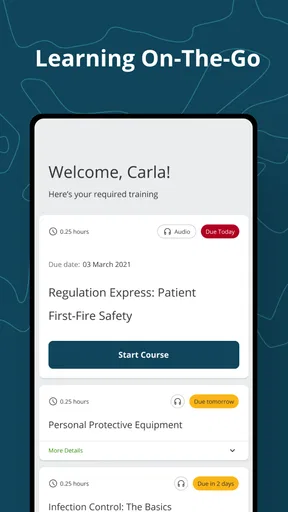
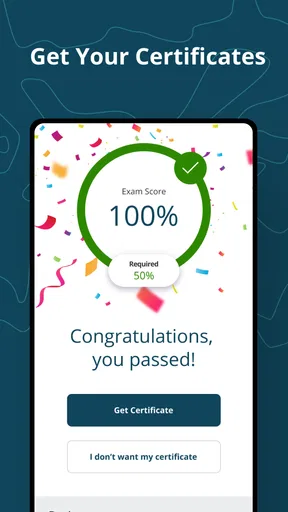
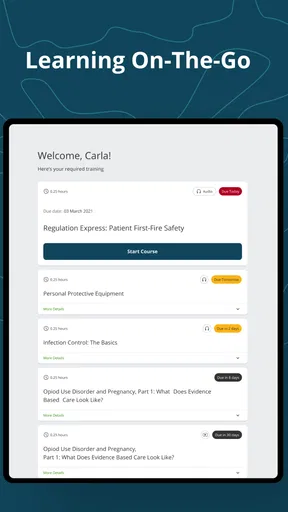
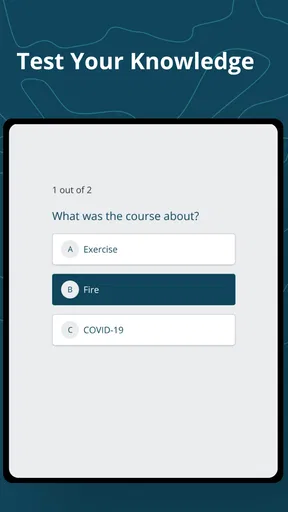
Our Review of Relias Learner
 Analysis by Appyee
Relias Learner is an education app built around one practical idea: letting people complete Relias training away from a desktop. I see it as a companion for learners who already have assigned coursework in the Relias system and need a more flexible way to keep moving through it. That distinction matters. This is not a general-purpose study app, a language-learning platform, or a library of open courses. Its value depends on whether your organization or training provider uses Relias.
In my experience, the strongest reason to use it is convenience rather than entertainment. Training often gets pushed aside when it requires a separate computer, a fixed desk, or a long uninterrupted session. A mobile route can make a short break, a commute as a passenger, or a quiet moment at home more useful. The app is most effective when it removes the “I need to sit at my computer first” barrier.
Relias Mobile is the developer behind this free Education app. It is available for Everyone and supports devices running Android 8.0 or later. The current version is 3.0.308793, and the app has passed the 100K+ install mark. Its average rating is 3.7 from around 615 ratings, which suggests a generally workable experience but also leaves room for frustration depending on the user’s device, account setup, and the way a training program is configured.
Mobile training is the central capability
The app’s defining capability is access to Relias training from a mobile device. That sounds simple, but the practical effect is significant for people whose learning is tied to work requirements. Instead of treating training as a task that belongs only at a workstation, the app makes it easier to fit assigned lessons into the spaces already available in the day.
I would not judge it by the standards I use for a feature-rich learning platform. The important question is not whether it offers colorful lessons, social study tools, or a broad discovery catalogue. The useful question is whether it helps a Relias learner continue assigned training with less friction. For that specific job, the mobile format makes sense.
This is especially relevant in care-related workplaces, where schedules can change quickly and staff may not have a predictable block of desk time. A learner might begin a module before a shift, continue during an approved break, and finish later at home. The benefit is not that the material becomes easier; rather, the opportunity to reach it becomes more flexible.
That flexibility also changes how I think about completion. On a desktop, I am more likely to wait until I have a large block of time. On a phone, I can approach training in smaller portions when the course allows it. I still need to pay attention, but I am less likely to postpone the entire task because the timing is inconvenient.
What the app is—and what it is not
Relias Learner should be understood as an access tool for Relias coursework, not as an independent educational destination. If you are looking for free lessons that you can browse without an organization, a personal curriculum planner, or a broad collection of unrelated subjects, this is probably the wrong choice. Its usefulness begins when you have a Relias learner account and assigned training to complete.
That account-based nature is an important trade-off. A general education app can often be opened immediately and explored without preparation. Here, the first hurdle is whether your employer, school, or training provider has already connected you to the Relias system. If that relationship is not in place, installing the app alone will not turn it into a complete learning service.
I also would not expect it to replace a full browser experience in every situation. Mobile access is excellent for convenience, but a larger screen may still be better for dense material, careful note-taking, or any lesson that demands extended concentration. The app’s role is to make training reachable, not necessarily to make every learning task equally comfortable on a small display.
How I would use it in everyday training
The most sensible workflow starts before opening the app. I would first check that my Relias account is active, confirm that I know the sign-in details, and make sure the phone meets the Android requirement. That small preparation avoids blaming the app for an account issue or an unsupported device. For workplace learners, it is also worth knowing whether training time must be completed in a particular setting or under a supervisor’s instructions.
Once signed in, I would treat the app as a focused work queue rather than something to browse casually. I would identify the next assigned course, read the instructions carefully, and begin only when I have enough uninterrupted time to understand the material. A phone makes access easier, but it can also introduce distractions. Notifications, calls, and a low battery can interrupt the learning session even when the app itself is functioning normally.
One useful habit is to divide sessions by purpose. I might use a short window to review the course area and understand what remains, then reserve a quieter period for the assessment or final portion of a lesson. This is a better approach than repeatedly opening the app without a plan. It reduces the chance of losing momentum and helps me distinguish between “I accessed the course” and “I actually completed the required work.”
I would also keep the phone stable and use a reliable connection whenever possible. Training is not the place to multitask aggressively. If the lesson includes important instructions or questions, reading while walking, working, or dealing with interruptions is a poor compromise. The mobile advantage is flexibility, not permission to treat required learning as background noise.
A realistic use case
Imagine a support worker who has an assigned Relias lesson but cannot reserve a computer until late in the day. With the app installed, that person can sign in during a suitable break, complete the portion that fits the available time, and return later when concentration is better. The worker does not need to turn a short opening in the schedule into a full desktop session.
The key word is “suitable.” I would not recommend completing serious training while rushing between duties or while responsible for someone who needs attention. A mobile device makes the course available, but the learner still needs an appropriate moment. Used responsibly, the app can turn fragmented time into progress. Used carelessly, it can encourage half-focused completion that benefits nobody.
For someone who travels to work as a passenger, another practical scenario is reviewing assigned material before arriving. I would avoid using it while driving, of course, but a passenger with a stable connection may find the phone format convenient. At home, the same learner could switch to a larger screen for more demanding work and keep the mobile app for quick access when that is more comfortable.
Small habits that improve the experience
I recommend treating each session as a checkpoint. Before leaving the course, I would make sure the work has had time to save and that I know what the next step is. I would not close the app immediately after answering a question or finishing a screen if the connection seems unstable. That extra pause is a simple safeguard against uncertainty about whether progress was recorded.
Another useful habit is to avoid starting a module when the phone is nearly out of power. This sounds obvious, but mobile training often happens precisely in spare moments, when battery levels are easy to overlook. A sudden shutdown can turn a convenient session into an avoidable interruption. Keeping the app updated is also sensible, particularly because the current release is 3.0.308793 and an older installation may not behave like the maintained version.
Finally, I would separate technical problems from course problems. If the app will not open, a sign-in fails, or the screen behaves unexpectedly, that is a support issue. If the material is confusing or an answer seems wrong, that is a learning-content issue. Identifying which kind of problem I am facing makes it easier to seek the right help instead of repeatedly restarting the phone.
Where the mobile format makes the biggest difference
The best scenario for Relias Learner is a person with assigned training, limited access to a desktop, and enough control over their schedule to choose responsible study moments. That combination lets the app solve a real problem without asking it to do more than it was designed to do.
It is particularly useful for learners who move between locations. A workstation-based routine can be awkward when training has to fit around shifts, visits, travel, or home responsibilities. Having the course available on a phone reduces the number of steps between remembering the assignment and acting on it. That reduction in friction can be more valuable than a long list of extra features.
The app can also help people who prefer to keep work-related learning separate from their personal computer. Some users do not want to install workplace software on a family laptop or wait for access to a shared machine. A phone provides a more personal route, although I would still pay attention to privacy and workplace rules when completing training in public spaces.
There is a psychological benefit too. When training is always associated with a formal desk setup, it can feel like a large task even when the next step is small. Mobile access makes the starting point feel lighter. I found that useful for reducing procrastination, but I would balance it with deliberate study habits so convenience does not become rushed completion.
When another option is better
A desktop browser is the better option when I need a larger view, want to compare information side by side, or expect to spend a long period studying. It is also preferable when the phone is old, the screen is uncomfortable, or interruptions are frequent. The mobile app should complement that setup, not force every learner into a phone-based workflow.
A general learning platform is better for someone choosing their own subjects. Those services usually focus on exploration, personal interests, and broad course catalogues. Relias Learner is more appropriate when the training is already assigned through Relias and completion matters within an existing program.
Likewise, a note-taking app may be better for building a personal reference system. I would not assume that mobile course access automatically provides the same tools as a dedicated study notebook. If I need detailed notes, I would prepare a simple method before starting, while still following any rules about handling workplace or sensitive information.
Trade-offs I noticed before recommending it
The first limitation is dependence on the Relias ecosystem. This is not a weakness for its intended audience, but it is a decisive filter for everyone else. Installing a free app can sound low-risk, yet the app has little value without relevant training access. I would confirm that my organization uses Relias before making it part of my routine.
The second trade-off is concentration. Phones are convenient because they are always nearby, but they are also full of interruptions. A message, call, or notification can break attention at exactly the wrong moment. I would use a quiet setting, silence unnecessary alerts, and avoid beginning a lesson when I know I will be interrupted repeatedly.
The third is screen comfort. Shorter sessions are easier to manage on a phone than long reading periods. If I experience eye strain, difficulty navigating, or trouble keeping track of instructions, I would move to a larger screen rather than forcing the mobile format. Accessibility and comfort are practical parts of successful training, not afterthoughts.
There is also a difference between access and accountability. The app can help me reach training, but it does not remove the responsibility to understand it, follow workplace guidance, or complete it in an approved manner. A mobile device may allow a lesson to be opened almost anywhere, but that does not mean every location is appropriate for confidential or mandatory learning.
The rating of 3.7 from roughly 615 ratings reflects that mixed reality. Many people can find the app useful for its central purpose, while others may encounter account, device, or workflow friction. I would not treat the rating as a final verdict. I would read it as a reminder that the experience is likely to depend heavily on how the surrounding Relias training setup is managed.
Questions I would settle before installing
Would I pay for it? No. The app is free, which makes testing it straightforward. The more important question is whether my training provider has already given me access. If not, the absence of a purchase price does not change the fact that the app may not have a meaningful personal use.
Can younger users install it? The content rating is Everyone, so the app is presented as suitable for a broad audience. Still, the actual lessons are tied to training contexts, and a parent or organization should consider whether the material and account are appropriate for the individual using it.
Will it work on an older phone? It requires Android 8.0 or later. I would check the operating system before troubleshooting anything else. If the device meets that requirement but the experience is still unstable, I would update the app, verify the account, and then contact the relevant training support channel.
Is it enough for every course task? I would not assume so. It is designed to make Relias training available on mobile, but a phone is not always the best environment for extended study. My practical recommendation is to use it for access and flexible progress, while keeping a desktop option available for sessions that demand more space or concentration.
Who gets the most value from Relias Learner
Relias Learner is a good fit for employees, students, and other learners who already belong to a Relias training program and regularly struggle to find computer time. It is especially appealing when the main obstacle is access rather than motivation. If I have the assignment and simply need a convenient way to reach it, the app addresses that problem directly.
I would also recommend it to people who prefer short, planned study windows. A learner who can use a break responsibly, continue at home, and switch between mobile and desktop when needed may get more value than someone who expects one device to handle every part of the experience perfectly.
I would skip it if I want independent courses, creative learning tools, or an app for casual education. I would also hesitate if my phone is uncomfortable for reading, my schedule rarely allows uninterrupted attention, or my organization requires training to be completed in a controlled desktop environment. In those cases, a browser-based workflow or another education service may be a better match.
After using it as a focused training companion, my opinion is positive but specific. The app does not need to be a complete school in your pocket to be useful. Its real contribution is giving Relias learners another practical route to assigned coursework. That can make a meaningful difference when time and location are the main barriers.
My final advice is to install it with realistic expectations: confirm your Relias access, keep the app current, choose appropriate study moments, and use a larger screen whenever the material demands it. For the right learner, the mobile option turns training from a task tied to one workstation into something easier to fit into an ordinary day. That is a modest feature, but in a busy schedule, it can be the difference between postponing a course and making steady progress.
Verdict
Strengths of Relias Learner
- Mobile access makes assigned training available away from a desktop.
- Course progress generally syncs with an organization’s Relias account.
- Supports varied learning formats, including videos and interactive lessons.
- Useful reminders can help learners stay on top of required coursework.
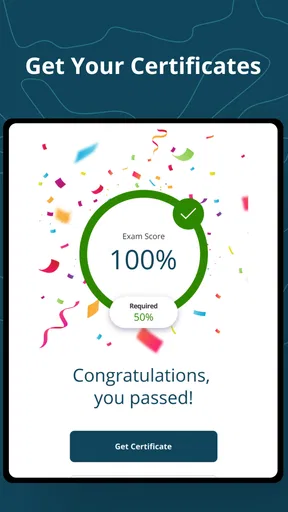
- Centralized certificates and completion records simplify compliance tracking.
Limitations of Relias Learner
- Requires an employer or institution account; it is not a standalone learning app.
- Course availability depends entirely on the organization’s assigned catalog.
- Some lessons may feel repetitive when completing mandatory compliance training.
- Performance can vary with older devices or unstable internet connections.
- Login or enrollment issues may require assistance from an administrator.
Other Releases by Relias Mobile
View All
Nurse.com
Medical4.2
Similar Picks in This Category
View All
Duolingo: Language Lessons
Duolingo4.7

Google Classroom
Google LLC2.8

Unacademy: Learn & Crack Exams
Unacademy3.2

Bible App for Kids
Life.Church4.4

Cake - Learn English & Korean
Cake Corp.4.7

Brainly: AI Homework Helper
Brainly4.5
Frequently Asked Questions
What is Relias Learner used for?
Relias Learner is a mobile learning app designed for employees and professionals whose organizations use the Relias training platform. It provides access to assigned courses, compliance training, educational materials, and assessments from a compatible Relias account. The exact content depends on your employer, school, or organization, so the app is not generally intended as a standalone learning service for everyone.
Do I need a Relias account or organization invitation to use the app?
Yes, in most cases you need login credentials connected to an organization that uses Relias. After installing the app, you may be asked to enter your organization details, username, password, or another authentication method. Relias Learner usually does not provide open registration for independent users. If you cannot sign in, contact your employer, administrator, or Relias support rather than creating multiple new accounts.
Can I complete courses offline with Relias Learner?
Offline availability depends on the course and the configuration selected by your organization. Some learning materials may be available after being opened or downloaded, while interactive lessons, tests, progress synchronization, and required acknowledgments may need an internet connection. It is best to connect to reliable Wi-Fi before starting training and reopen the app online afterward so completed activities and scores can synchronize correctly.
Does Relias Learner track my progress and course completion?
The app is built to record learning activity associated with your Relias account, including course progress, assessment results, and completion status when supported by the assigned training. This information may be used by your organization to monitor required education or compliance deadlines. Because tracking rules vary, review your organization’s policies and confirm that the app has synchronized before assuming a course has been officially completed.
What should I do if Relias Learner crashes or will not let me log in?
Start by checking your internet connection, updating the app, and confirming that your device’s operating system is supported. Force-closing and reopening the app, restarting the device, or clearing temporary app data may also help. If the problem involves credentials, organization access, or missing assignments, your administrator may need to resolve it. Avoid repeatedly entering an incorrect password, as this could temporarily lock your account.
